Showing posts with label study. Show all posts
Sunday, June 10, 2012
studying the medieval inn
Exploring a few different configurations as a study . I'm going to do some rough thumbs to play with different shapes and silhouettes and then tackle the final piece.
13 heads
Labels:
12inch figure,
concept,
custom head ideas,
heads,
study
Wednesday, April 20, 2011
playing with /making brushes
some oddness .i made a weird bush that makes a sort of texture oil paint brush .not super controllable but seems nice for quick under paint stuff.
Thursday, March 10, 2011
Gradient Map Tutorial
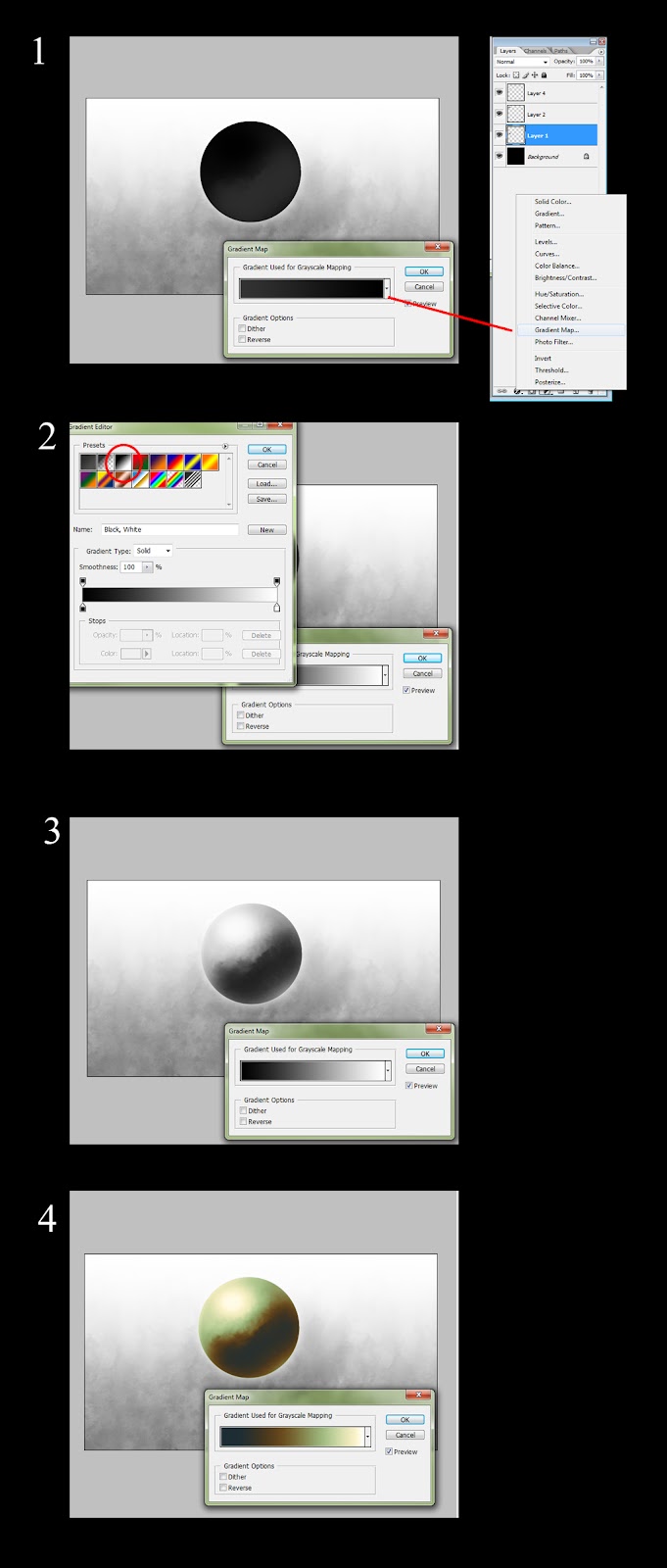
I discovered this about 2 years ago and its a nice Little thing to have in your Digital tool box .I often find my self trying to explain the process to people but i feel like words alone fall Short with out some example.This illustrates the steps involve but it definitely takes some individual experimentation to get it to work for you.
Lets Dig in!
I hope this is helpful ! If you catch any mistakes(which i am sure you will) or can see places to make this tutorial better please let me know and i will edit .thanks!
Lets Dig in!
this will be our test subject .hovering sphere .make a selection of the sphere
- At the bottoms of the layers panel select the create new fill/ adjustment layer icon and select gradient map. It will look immediately odd because it uses the first preset by default.
- In the presets select the 3rd preset in .this will make everything look normal again .This is because it is a gradient that goes from dark on the left to light on the right.this is important to remember in order to work with gradient maps.The color on the far left will be applied to the darkest value and the far right color will be applied to the lightest value.
- You are ready to start messing with colors!
- You can create or select the existing" tabs" along the gradient and adjust their color using the color swatch below the gradient.you will notice that each tab has adjustable points on ether side to clamp the color closer to the original point. You can also delete with the delete button or select one and repeat it elsewhere just by touching the gradient. A big part of using these effectively is sliding the tabs along the gradient so you get the right color matching the right value range . Try it out and see what you get.
A nice use for these in games is also matching colors between several textures by just dragging and dropping gradient map layers into other image files and then tweaking.
I hope this is helpful ! If you catch any mistakes(which i am sure you will) or can see places to make this tutorial better please let me know and i will edit .thanks!
Sunday, February 13, 2011
Recon car/hatch studies
Loading up the brain library again .I found my self drawing hinges and hatches all the same and when i started looking at reference i found that there were many cool solutions the the concept of a hinged panel .
WW 2 fighter plane engine studies
I was Doing some plane concepts the other day and realized i kept falling back on certain things .A hinge works like this .A vent looks like this. A pipe attaches like this.I was finding it wasn't looking very convincing to me and it didn't give me allot of variety to" jam" with in whence to kick forth.
My idea at that point was to try and add to my Brain library .I gather up a heap of reference and just redraw what was there in front of me .I found the shapes can look like a big mess but allot of the times your forcing your brain to conjugate what your looking at which was pretty cool .The more you understand how something works the better you can twist it and still have it look good. The vocabulary of an engine tends to be intake /exhaust /thrust and if you can describe these in a new way or specify how it works better in your image than you will probably have something people will like and relate to .
Since i did this study i have not yet gone back and tried more plane concepts but i do know i put a few more things in my brain Library and this is a good thing.
My idea at that point was to try and add to my Brain library .I gather up a heap of reference and just redraw what was there in front of me .I found the shapes can look like a big mess but allot of the times your forcing your brain to conjugate what your looking at which was pretty cool .The more you understand how something works the better you can twist it and still have it look good. The vocabulary of an engine tends to be intake /exhaust /thrust and if you can describe these in a new way or specify how it works better in your image than you will probably have something people will like and relate to .
Since i did this study i have not yet gone back and tried more plane concepts but i do know i put a few more things in my brain Library and this is a good thing.
Labels:
engine study,
fighter,
fighter planes,
from life,
mechanical,
plane engine,
refrence,
study,
ww2
Wednesday, December 29, 2010
the Pook rough layout and color wip
this is just to figure out composition and to play with color .Im going to transfer it onto a 18x 20 board to do the final clean version.
Monday, January 25, 2010
tree study

so were doing these art lunches at work .We started just talking about projects we were doing or books we like or what ever.Its amazing how fast an hour goes.Last week we talked about trees and what we like about other artists techniques .Here's my own study
Subscribe to:
Posts (Atom)